Part 1 of 6. The whole series uses one running example: this website, and the real git history behind it.
Someone recently asked me: "When you use AI tools, what do you do differently than most people?"
I thought about it. Then I realised the best answer wasn't a paragraph. It was this entire website. So here's the story.
This is the first of six posts. By the end of the series you should be able to go from chatting with an AI to running an agent that can touch a real codebase, use real tools, read your real content, and be stopped from doing anything stupid. Every example comes from this site's repository, including the parts that broke.
Let's start with what most people do
I'm not judging. I've done it too. But let's be honest about the pattern.
You open a chat window. You type "Build me a portfolio website." You get a wall of code. You copy it. You paste it. Something breaks. You go back and say "Fix this error." You repeat that about fifteen times. You end up with something that kind of works but you have no idea how. You can't change it. You can't fix it. You're stuck.
I call this vending machine mode. You put in a request, you get something out, and you have no idea what happened inside the machine. The moment it gives you the wrong thing, you are lost.
That works for small stuff. Need a quick script? Fine. Building a real product? That needs something else.
So what actually is an agent?
Here is the difference, in one line.
A chat window can only talk. An agent can do things and see what happened.
That is genuinely most of it. A chat window takes your text and returns text. An agent has a loop: it can take an action, look at the result, and decide what to do next.
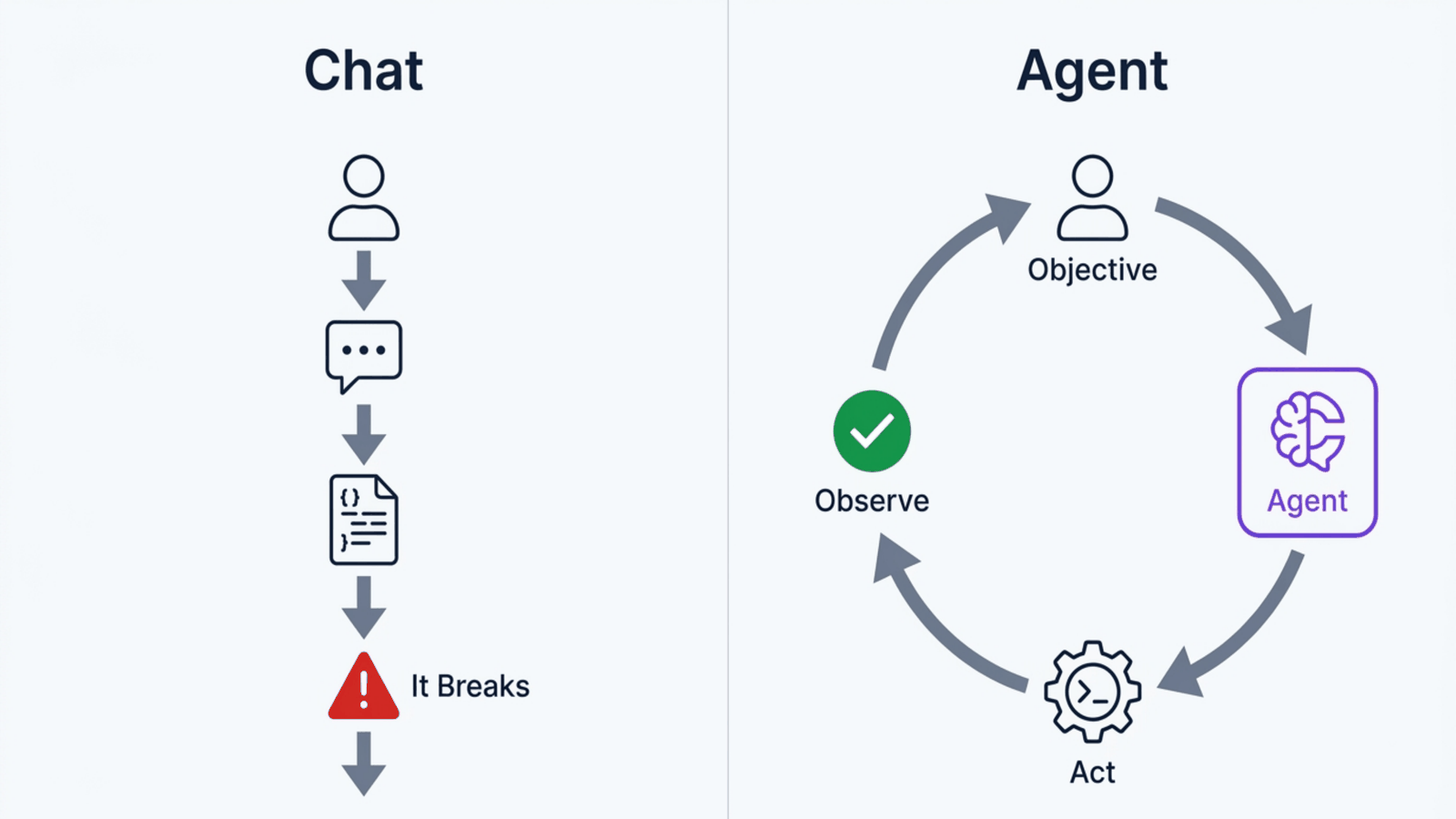
The loop is the whole thing. It is why an agent can run your build, read the error, fix the file, and run the build again, while a chat window can only tell you what the error probably means.
Three words you will keep meeting, in normal English:
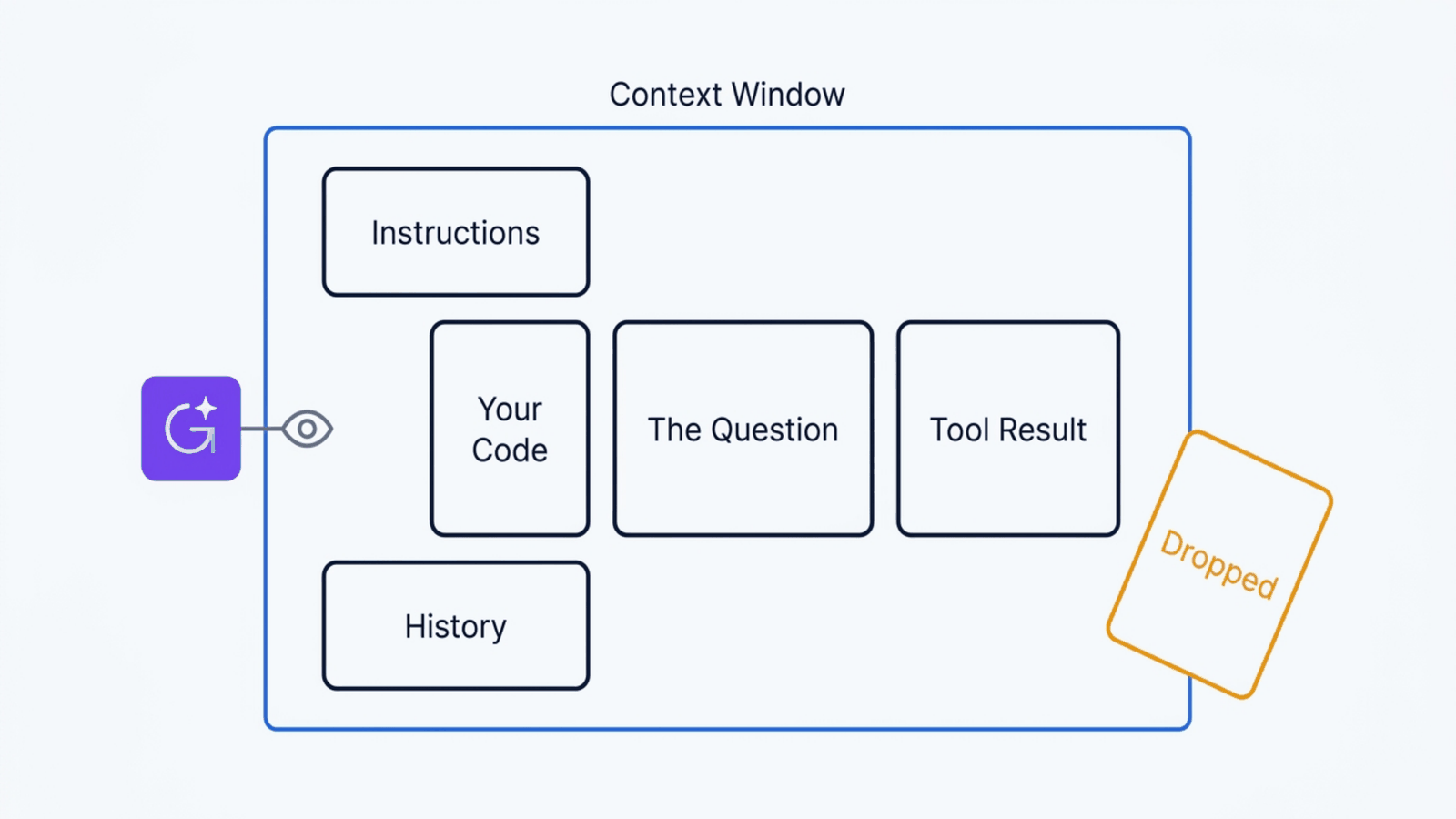
Context is everything the model can see when it answers. Your question, your files, the error message, the instructions you gave it earlier.
Context window is how much of that it can hold at once. Think of it as desk space, not memory. When the desk is full, something falls off the edge.
Tokens are how that space is measured. Roughly, a token is a chunk of a word. You pay per token, and you run out of desk per token, which is why "just paste the whole codebase in" is not a strategy.
Step 1: I told it what I wanted, not how to build it
I didn't know I was going to use Next.js. I didn't pick React. I didn't choose Tailwind. The agent recommended all of that. But I knew exactly what I wanted the result to be.
I said things like:
"I want a portfolio site that feels like a space observatory. Dark background. Glowing particles that look like neural networks. When someone visits, they should feel like they're looking into something intelligent."
"I need a blog where I can write technical posts with code examples and math equations. I want the posts to just be files I write in a folder. No database for the blog."
"I want an AI chatbot on the site that sounds like me. It should know about my career, my projects, my philosophy."
Notice what I did not say. I did not say "use Next.js". I did not say "use MDX". I described what I wanted the thing to do and how it should feel.
It came back with: Next.js with the App Router, because I needed both static pages and dynamic API routes. MDX for the blog, so posts stay as files with code blocks and maths. The Vercel AI SDK for streaming chat responses.
I said yes, and we started building.
You don't need to know the tools. You need to know what you want. The model has the technical knowledge. What it does not have is your intent.
Step 2: I asked questions instead of giving orders
This is the part nobody teaches. The secret is not better prompts. It is better questions.
"Build me X" is an order, and an order without context produces something generic. So I asked:
"What's the best way to structure this so I can add new pages without rewriting the layout?"
"If I want the chatbot limited to 10 messages per person per day, where should that logic live? Client or server?"
"What happens when the blog gets to 50 posts? Will the build slow down?"
Each question taught me something, and each answer shaped the architecture. I was not blindly accepting code. I was having a conversation about design. The agent explained the trade-offs, I made the decisions, it wrote the code.
It is like working with a builder. You do not need to know how to pour concrete. You do need to say "three bedrooms, open kitchen, living room facing the garden".
Step 3: I built one room at a time
Another common mistake: trying to get the whole thing in one prompt. "Build me a complete portfolio with a blog, contact form, animations and an AI chatbot." That is asking someone to build your house in an afternoon.
I built the layout first. Navigation, footer, background animation. Tested it. Committed it to git. Then the homepage. Then about, work, blog.
Each piece I reviewed. "Why this approach and not that one?" "What happens on a phone?" And each working piece got committed, which matters more than it sounds. Git is an unlimited undo button that also keeps a diary. When an agent is writing code fast, the ability to say "go back to the last version that worked" is the difference between a bad hour and a lost day.
Why one giant prompt is never enough
Here is the thing that took me longest to internalise.
The model does not know your project. It knows programming. Those are very different, and the gap between them is context.
When I started, I would explain the same things every session: this is a Next.js
site, posts are MDX files in content/blog, do not use a database for the blog.
Every time. That is your desk space going on repetition instead of work.
Two things fix it. Project instructions, a file the agent reads every time, so the standing rules live somewhere permanent instead of in your typing. And repository context, letting the agent read the actual code rather than guessing from your description.
This is why an agent that runs in your terminal, in your project, beats a chat window in a browser. Not because the model is better. It is the same model. It can just see more of the truth.
Feedback is the whole trick
The single biggest difference between someone who gets good results and someone who gets frustrated is whether the agent can find out that it was wrong.
If it writes code and nobody runs it, you have a very confident guess. If it writes code and runs the build, the build fails, and it reads the failure, you have engineering.
   change
     ↓
   run it
     ↓
   read the result
     ↓
   fix
     ↺
That loop is the spine of this whole series. Everything in the next five parts is either giving the agent something to act on, or giving it a way to find out whether the action worked.
The framework I use for knowing what to ask
I call it the Mom Test. If you can explain what you want to your mother, you can explain it to an agent.
Don't say: "Implement a rate-limited streaming API route with Supabase-backed IP tracking."
Say: "I want the chatbot to only allow 10 messages per person per day so nobody runs up my bill."
The agent translates plain language into technical decisions. That is its job. You bring the what and the why.
Four kinds of question that consistently work:
Vision: "I want it to feel like X."
Behaviour: "What happens when someone does X?"
Protection: "What if someone abuses this? How do I avoid a huge bill?"
Quality: "Will this work on phones? What if I have 1000 posts?"
You do not need to ask about React hooks or server components. You need to know what you are building and care about getting it right.
What I actually contributed
Could I have built this without AI? Technically yes, in months rather than days.
Could it have built this without me? No. It would have produced a generic template that looks like every other portfolio on the internet.
My side: the vision, the decisions, the quality bar, and the debugging context. Its side: every line of code, every technical recommendation, and knowledge of hundreds of tools I have never used.
The combination is the point. Not AI alone. Not me alone.
Where this breaks down
Everything above got me a working site. Then I hit a wall, and it is the wall everyone hits.
The product does not live only in source files.
The database is somewhere else. The hosting platform is somewhere else. The deployment logs are somewhere else. So the loop kept breaking at the same place: the agent would make a change, and then I would become the courier, copying error messages from a browser tab back into the terminal by hand.
An agent that cannot see the result of its own actions is back to being a chat window with extra steps.
That is Part 2. How you give an agent hands, what it can safely touch, and why the moment it becomes genuinely useful is also the moment it becomes genuinely dangerous.
Try it yourself
Reading about agents only gets you so far, so I built a small companion kit you can download and run: agent-roadmap-kit on GitHub. Each part of this series is one stop in it. By Part 6 the pieces add up to one working assistant that answers customer questions for a made up Soshanguve home kitchen, Mama Dineo's Kitchen, from a folder of its notes. Swap in your own notes and it answers about yours.
It costs nothing to run. You need Node 22.18 or newer and one of three free options: a Gemini key from Google AI Studio (no credit card), a small model on your own machine through Ollama, or the built in mock, which needs no key and no internet at all.
git clone https://github.com/LeparaLaMapara/agent-roadmap-kit
cd agent-roadmap-kit
npm install
npm run check
This first stop is the chat half of "chat versus agent", plus the templates I actually use. It lives in the Part 1 folder of the kit.
npm run part1 -- --once "Do you deliver to Block L?"
- Ask the chat a question the notes can answer. With no tools it cannot see them, which is the whole point of Part 2.
- Keep a chat going for ten turns and watch the tokens sent grow every turn. That is the context window filling up.
- Copy the brief template and fill it in for your own project, saying what you want and why, never how.
- Copy the starter instructions file into your project and write the "how to run and check it" section first. It is how an agent finds out it was wrong.
Next: Part 2: Giving an Agent Hands.
If you want the argument for why this changes the job itself rather than just the tooling, that is in The Modern Data Scientist.