Part 3 of 6. Previous: Part 2: Giving an Agent Hands.
There is a chat assistant on this site. You can ask it what I think about MLOps, or what I did at a previous job, and it answers from things I have actually written rather than making a confident guess.
Getting there taught me the most useful lesson in this entire series, so I will put it up front.
Most bad AI answers are not a bad model. They are a good model that was handed bad information.
Those two look identical from the outside. Both produce a wrong answer in a confident voice. But they have completely different fixes, and if you misdiagnose, you will waste weeks swapping models when the problem was that your search returned nothing.
The problem, plainly
A model knows what it learned during training. It does not know your blog posts, your CV, or the talk you gave last March.
You could paste everything in. For a while I did. But remember the desk space idea from Part 1: everything you paste costs tokens and takes room, and most of what you paste is irrelevant to this particular question. Paste in fifty posts to answer one question about Databricks and you have paid for forty nine posts of noise.
So the actual job is narrower and more sensible: find the few relevant pieces, and show it only those.
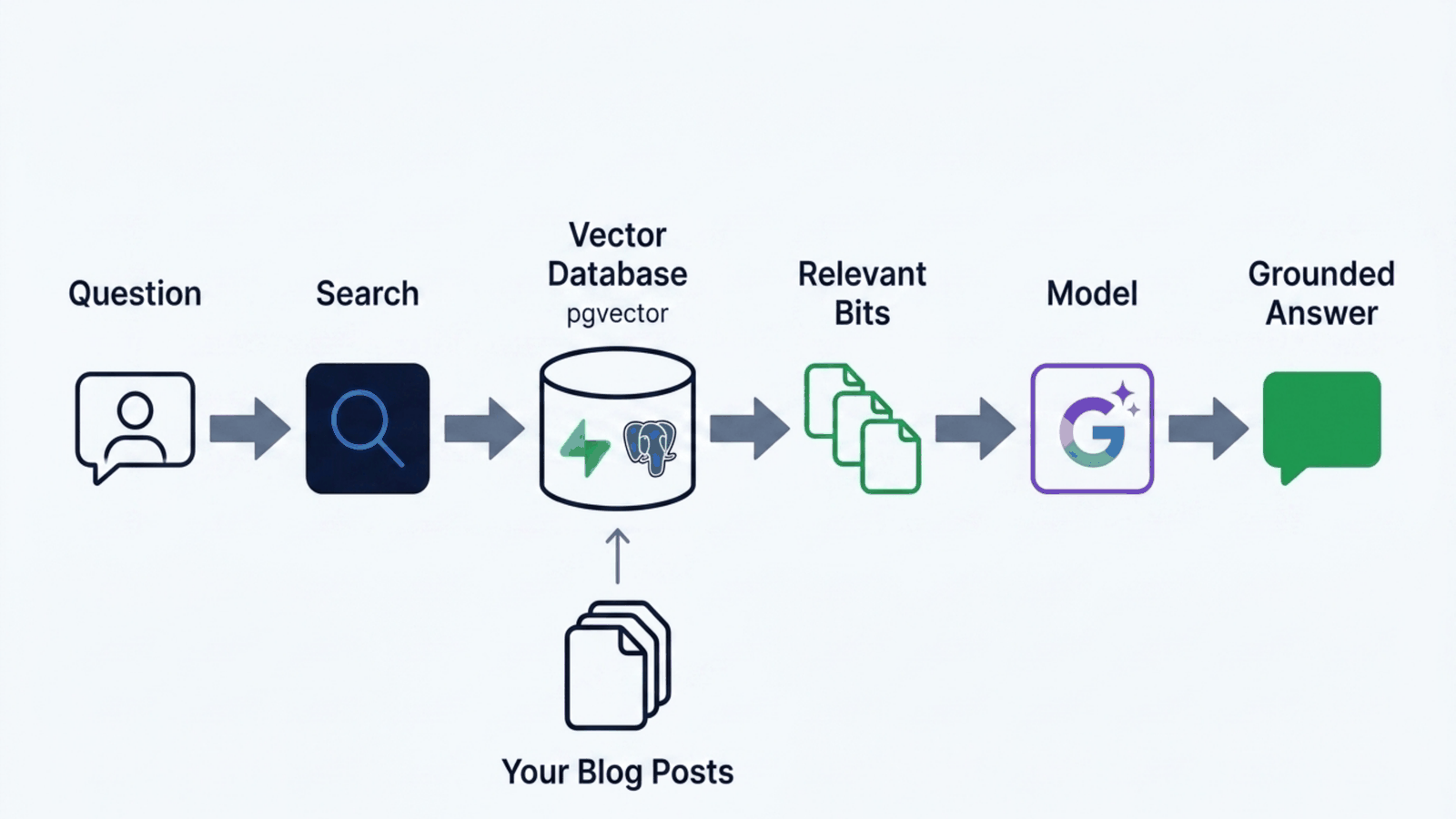
That pattern has a name, RAG, for retrieval augmented generation. It sounds grand. It means "look it up first, then answer".
The four steps, in normal English
Chunking. Cut the writing into pieces. Not whole posts, because a post is mostly irrelevant to any single question. Not sentences, because a sentence on its own loses its meaning. This site cuts on paragraph boundaries at roughly 1200 characters, with about 150 characters of overlap carried into the next piece so an idea that straddles a boundary is not sliced in half.
Embeddings. Turn each piece into a list of numbers that represents its meaning. The useful property is that pieces about similar things end up with similar numbers, even when they share no words. So "how do you deploy models" can find a paragraph about production pipelines that never uses the word deploy.
Storing. Keep those numbers in a database that can compare them quickly. This site uses Postgres with pgvector, which is Postgres with the ability to store and compare these lists.
Retrieval. When a question arrives, turn the question into numbers the same way, find the closest pieces, and hand those to the model.
The settings I use, since vague advice helps nobody: 768 dimensions for the embeddings, 8 pieces retrieved per question, and a similarity threshold of 0.4, which is deliberately permissive. Focused questions come back well above it; questions that ask three things at once land nearer 0.5, and I would rather retrieve slightly too much and let the model ignore the noise than retrieve nothing and have it invent an answer.
Precision and recall, without the textbook
Two words worth knowing, because they name the two ways search fails.
Precision asks: of what I found, how much was actually useful? Low precision means you handed the model a pile of junk with the answer buried in it.
Recall asks: of everything useful that existed, how much did I find? Low recall means the answer was sitting in your database and your search walked past it.
They pull against each other. Retrieve more and recall goes up while precision goes down. My threshold of 0.4 and count of 8 is a bet on recall, because for this use case a slightly noisy context is much less damaging than a missing one.
I want to be straight about something here. I do not run a formal evaluation of this. There is no test set of questions with known correct sources, no measured precision and recall score in the repository. I tuned these numbers by asking real questions and reading the answers. That is a reasonable way to start and a bad place to stay, and if this assistant mattered commercially it would be the first thing I built next.
Three bugs where the model was innocent
Now the useful part. These all really happened, and all three produced the same symptom: an assistant that answered badly while the model was working perfectly.
The index that returned nothing
To make vector search fast at scale you add an index. I added one, of a common type that works by grouping vectors into clusters and only searching the nearest cluster.
It made things worse. Some questions came back with zero results on a corpus where the answer definitely existed.
The reason is a genuinely good lesson. That index type learns its clusters from the data. With only a few hundred vectors, some clusters come out empty. If your question lands nearest an empty cluster, and the search only looks in the nearest cluster, it finds nothing at all. Not a worse answer. Nothing.
The fix was to delete the index. At this corpus size, checking every vector takes under a millisecond and finds the right answer every time. The commit that removed it says exact scan is sub millisecond and 100% recall, and the migration now carries a comment saying to add a different index type only once the corpus reaches thousands of rows.
What you can copy: an optimisation that fires before you have the scale to need it is not neutral. It can be worse than nothing, and it fails in a way that looks like the model being stupid.
The database that was the wrong database
This one cost me the most time.
Retrieval worked perfectly on my machine and returned nothing in production. The model was identical. The code was identical. The corpus was there. I checked it myself.
I was checking the wrong copy. The site's runtime configuration pointed at one Supabase project, and the knowledge base with all the indexed content lived in a different one. Locally my environment happened to point at the right one, so locally everything was fine.
The fix was to stop letting retrieval inherit whichever database the rest of the site was using, and pin it explicitly to the project that actually holds the knowledge base. There is a commit whose entire message is "pin KB retrieval to the project that holds the data", which is the sort of commit message that only makes sense after you have lost an afternoon.
The right database with the wrong key
Immediately after that, a second version of the same problem. Retrieval was now pointed at the right project but still failing, this time with an invalid API key error.
It was using the site's credentials rather than the knowledge base project's own. Right door, wrong key.
The pattern across both: when a component depends on configuration that something else owns, it will eventually get configuration that something else changed. Retrieval now names what it needs explicitly instead of inheriting it.
What saves you when retrieval fails anyway
Two things in this system, both deliberately boring.
There is a kill switch. Retrieval is on by default and can be turned off with a single environment variable, at which point the assistant falls back to a static description of who I am. Not as good, and infinitely better than broken.
And retrieval failure is not fatal. If the search errors or returns nothing, the code falls back to that same static context rather than throwing. The assistant gets less specific. It does not go down.
That is a general principle worth stealing. The probabilistic part of your system should fail into a boring deterministic path, not into an error page.
The staleness trap
One last thing, because it caught me again this week.
The index is a copy. When I edit a post, the site updates instantly and the index does not. Until it is rebuilt, the assistant is confidently quoting a version of my writing that no longer exists.
The reindex is cheap because it skips anything unchanged: it hashes each piece of content and only re-embeds what actually differs. But it has to be run. I have now been caught by this more than once, most recently after rewriting a post substantially, where the assistant kept citing the old framing for hours.
What you can copy: if you build retrieval over content that changes, decide now how the index gets refreshed, and assume you will forget to do it manually.
Where this leaves us
The agent can act, and now it can answer from real knowledge. Which quietly introduces something new and slightly alarming.
The system now reads text and behaves differently because of what it read. Right now the text is mine, so that is fine. But the same mechanism that lets it read my blog post lets it read a database row somebody else wrote, or a web page, or an issue comment.
Text that arrives from outside and influences behaviour is the entire security problem in one sentence.
That is Part 4: what actually stops an agent doing something damaging, why instructions in a prompt are not a security control, and what this site does at the infrastructure level so that a bad decision cannot become a bad outcome.
Try it yourself
The companion kit rebuilds this post at small scale, fully local and free: chunking, embeddings, an exact scan, and all three bugs, reproduced. It lives in the Part 3 folder of the kit, with setup in the kit's README. The first run downloads a 23 MB embedding model; after that it works offline.
npm run part3 -- --compare "When do you shut?"
npm run part3:bugs
- Compare keyword and meaning based search on a question that shares no words with the answer. Keyword search finds nothing; search by meaning finds the opening hours.
- Run the bugs script and watch a clustering index return zero results on a small corpus, while checking every vector takes microseconds and never misses.
- Raise the similarity threshold and ask again. Retrieval comes back empty and the answer gets worse, while the model has not changed at all.
- Point the kit at a different notes folder without rebuilding. The index names what it was built from and refuses, instead of quietly answering from the wrong data.
- Edit a note and ask again. The kit spots the stale index and embeds only the piece that changed.
Next: Part 4: Making Agents Safe Enough to Act. Previous: Part 2: Giving an Agent Hands.