Part 2 of 6. Previous: Part 1: From Chat to Agent.
At the end of Part 1 I had an agent that could read and write files in my project, and a problem. The product does not live only in files.
The database lives somewhere else. The hosting platform lives somewhere else. The build logs live somewhere else. So every time something went wrong outside the codebase, the loop broke and I became the courier: copy the error out of a browser tab, paste it into the terminal, wait, copy the next one.
That is not automation. That is me doing data entry for a computer.
A tool is just a function it can call
Here is the whole idea, stripped of jargon.
A tool is a function you let the model call, and whose result it gets to see.
That is it. Not magic. You describe what the function does and what it needs. When the model decides it needs that thing, it asks for it, your code runs it, and the answer comes back into the conversation.
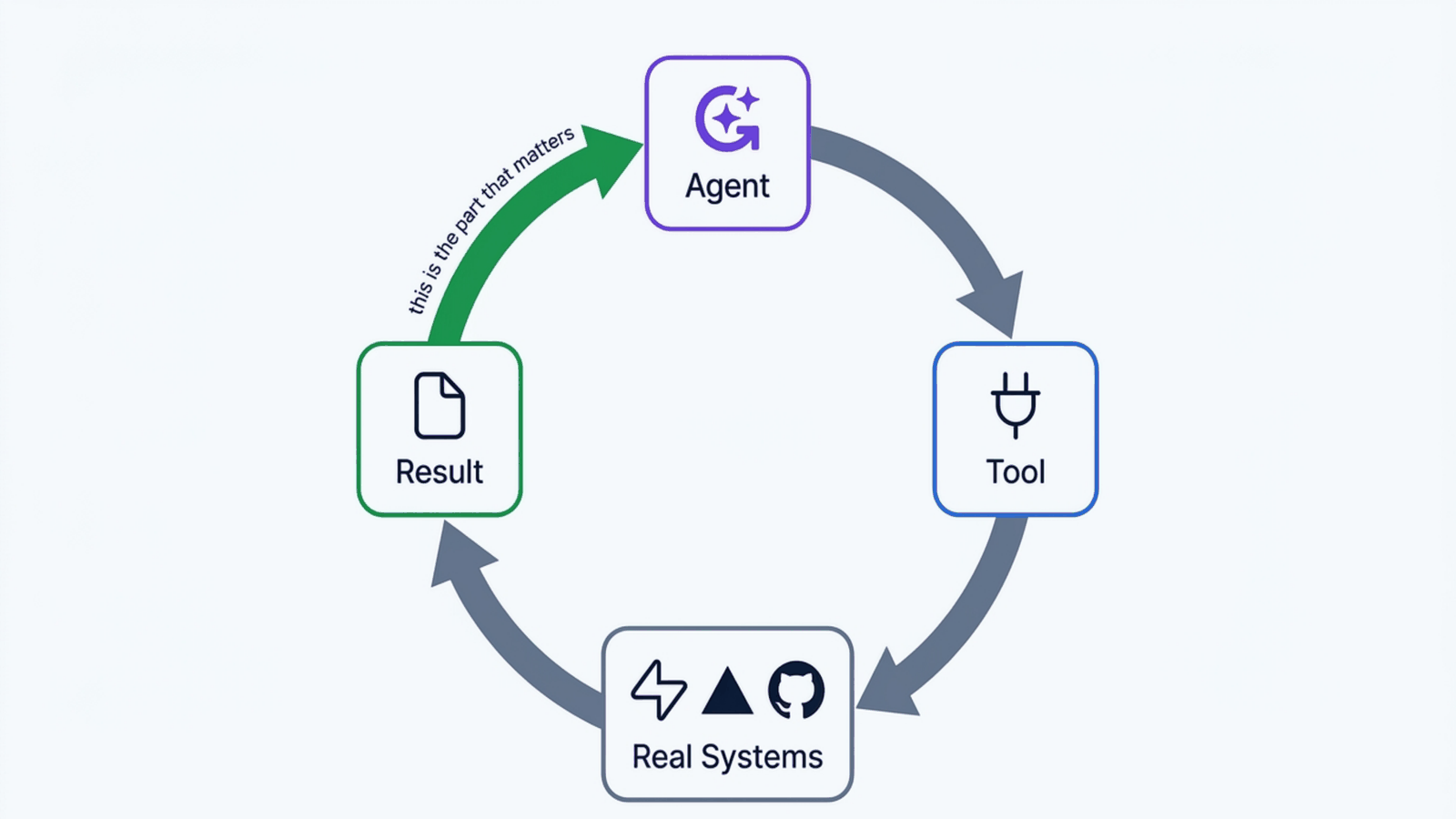
The important part is the last arrow. Without the result coming back, you have a very confident suggestion. With it, you have that loop from Part 1 closing outside your codebase as well as inside it.
MCP: the part nobody talks about
MCP stands for Model Context Protocol. Ignore the name for a second.
Think about how you normally use AI. You chat in a browser window. You type text, it types text back. It cannot see your files, check your site, or look at your database. It is like talking to a very smart person locked in a room with no windows.
MCP is the window.
More precisely, it is an agreed way for a tool provider to describe what it offers, so that any agent can use it without somebody writing custom glue for every pair. Before it, connecting an agent to a service meant bespoke integration work each time. Now the service ships a small server that says "here is what I can do", and the agent can use it.
When I connected the Vercel one, the agent could check whether the site was live, read build logs, and see which deployments failed. When I connected Supabase, it could work with the database directly instead of me opening a dashboard and running SQL by hand.
Without MCP, using AI is like a phone call with an expert who can only hear your voice. With it, that expert is sitting at your desk, looking at your screen, and using your tools.
What that actually changed, twice in one session
Two real failures from this site, both from the same evening.
The site would not go live
Everything compiled. Then the deploy stopped dead:
Error: Vulnerable version of
next-mdx-remote (5.0.0).
Update to 6.0.0 or later.
The blog rendering library had a security advisory against it. I had already fixed it on my development branch, but the branch being deployed still had the old version. Reading the build log directly, the agent could trace it: check the version in the lockfile, check what is actually installed, check which branch is being built. Then merge and redeploy.
The fix was small. The interesting part is that nobody had to describe the error to anybody. It read the log itself.
The chatbot was silent
After deployment the chat feature did nothing at all. No response, no visible error. The server log said:
Could not find the table
'public.chat_rate_limits'
in the schema cache
The rate limiting table existed on my machine and not in production. Classic. It worked locally because local was different, which is the oldest bug in software.
With database access, the agent created the missing table directly. About thirty seconds. Without it, that is a context switch into a dashboard, finding the SQL editor, and running the statement by hand while holding the error in my head.
What you can copy: the value is not that it typed SQL for me. It is that the diagnosis and the fix happened in the same place, with no translation step where I could lose a detail.
Read, write, and the difference that matters
The moment your agent can write to real systems, the stakes change completely.
Worth separating in your head:
Read tools tell it things. Fetch the build log, list the tables, get the deploy status. Worst case, it reads something and is wrong about it.
Write tools change things. Create a table, delete a file, trigger a deploy. Worst case is quite different.
The other axis is local versus production. A mistake against a local database costs you a rerun. The same mistake against production costs you customer data.
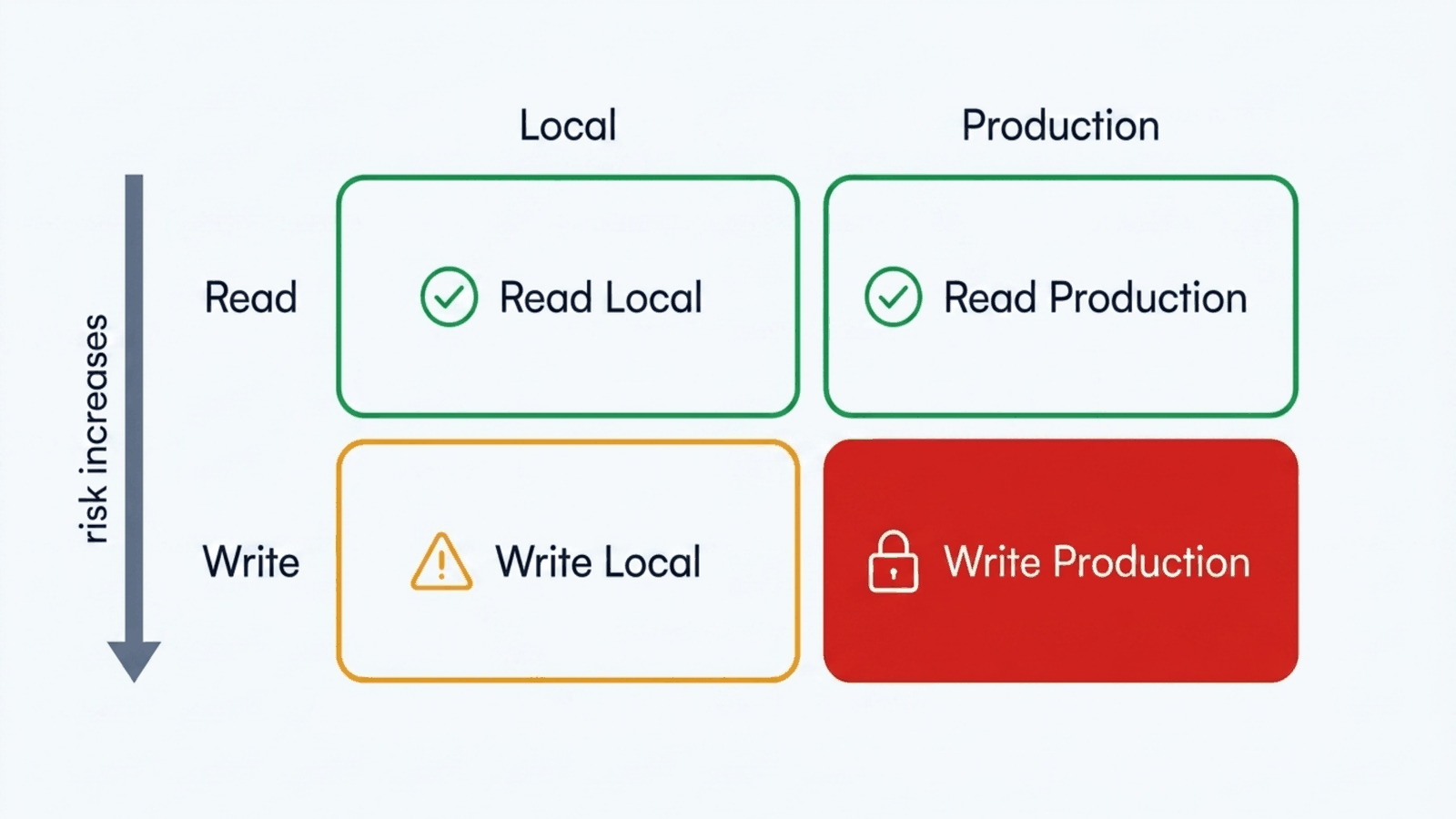
Those two axes give you four boxes, and they deserve four different levels of paranoia. I did not think about this carefully at the start, which brings me to the part I am not especially proud of.
My permissions file, honestly
Agents that run in your terminal have a permissions configuration: which commands run without asking, which prompt you first, which are refused outright.
Mine, in this repo, currently has 24 allow rules, zero deny rules and zero ask
rules. They are almost all narrow read-only commands, mostly specific
gh invocations for reading workflow runs and logs, which is exactly the shape
you want: precise, and about looking rather than changing.
But zero deny rules is a gap, and I want to name it rather than dress it up. My protection right now comes from two things. The allow list is narrow, so anything outside it prompts me. And the genuinely dangerous capabilities are not in the project at all: the credentials that could damage production live outside the repository entirely.
That is defence by circumstance more than by design. An explicit deny list for destructive operations would be better, and it is the honest next step for this project rather than something I can claim I already did.
What you can copy: start with an allow list narrow enough to be boring. Read before write. Local before production. And if you find yourself approving the same command forty times, that is a signal to add it to the list, not a signal to turn approvals off.
One more thing tools buy you: the ability to change your mind
This site's chat feature does not run on the model it launched with.
The git history is blunt about it. One commit fixes a wrong Claude model identifier, a single incorrect string that made the whole feature fail silently. Later, another commit moves off a Gemini model that had been retired by the provider onto its replacement. Today it runs Gemini 2.5 Flash.
Two lessons in there.
Models are not stable ground. They get retired. Identifiers change. If your code names one model in one place with no plan for that, you will find out during an outage rather than during a migration.
A thin abstraction saves you. I use the Vercel AI SDK, which gives one interface across providers. Switching meant changing which provider function was called, not rewriting how the feature streams responses.
I want to be careful not to oversell that. It is a provider interface, not a model gateway. There is no router in this project deciding between models by cost or latency, no automatic fallback to a second provider when the first fails, and no traffic splitting. Those are real things that real systems have. This one does not have them, and Part 6 is where I will say what I would build if I needed them.
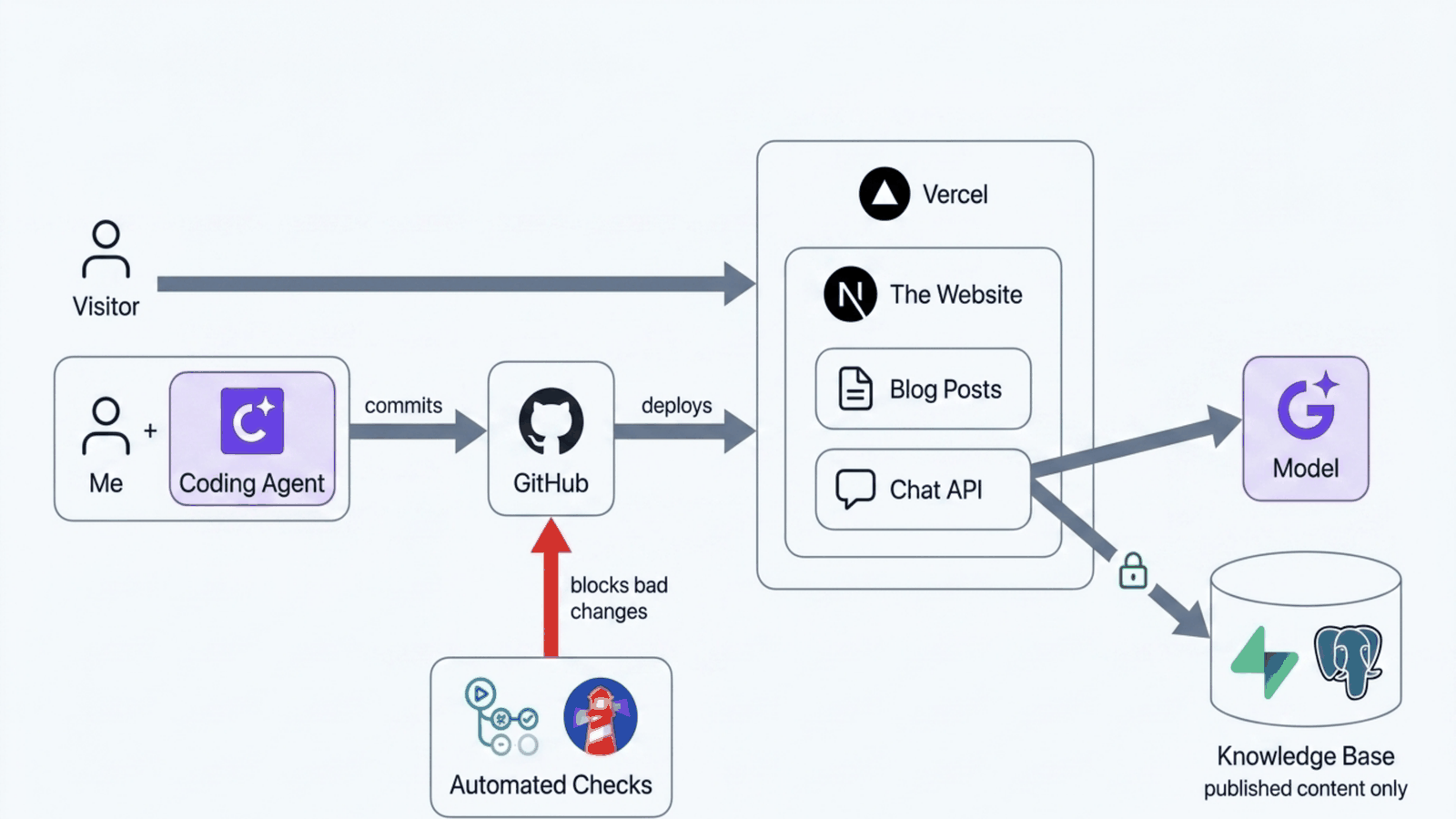
Here is the whole thing, which is worth seeing once before the next four parts take it apart layer by layer. Me and the agent on the left, committing to GitHub. GitHub deploying to Vercel. The site serving blog posts and a chat API. The chat API reaching a model and a knowledge base. The automated checks underneath, blocking bad changes before they ever reach a visitor.
The uncomfortable part
Everything in this post made the agent more useful by making it more powerful. Those are the same sentence.
An agent that can read your build logs can also read anything else those credentials reach. An agent that can create a database table can drop one. The protection cannot be that you asked it nicely.
I am going to leave that hanging on purpose, because it deserves its own post, and because there is something that has to come first.
Right now my agent has hands. What it does not have is knowledge of me. It knows programming, and it can touch my systems, but ask it what I actually think about MLOps and it has nothing. The chat feature on this site is supposed to answer as me, from my real writing, and a general purpose model plus a friendly tone is not that.
That is Part 3: how you give an agent knowledge it did not have, why "the model is bad" is usually the wrong diagnosis, and the retrieval bugs on this site that took me longest to find.
Try it yourself
The companion kit has a working version of this post: a keyword search tool, an agent loop, and a small MCP server, in the Part 2 folder of the kit. It is free to run, and the kit's README has the setup.
npm run part2
npm run part2:inspect
- Run the agent and watch the loop happen: the model asks for the search tool, reads the result, then answers.
- Open the MCP Inspector and list the tools. Only the read tools are there until you switch writes on, which is the read versus write line from this post, enforced in code.
- Connect the server to Claude Desktop with the snippet in the folder's README. Local MCP servers work on the free plan.
- Ask "Are all plates free this week?" and watch a planted line in the customer feedback fool a small model. Tools give an agent power, not judgement.
- Use the example permissions file as a starting point for your own: an allow list narrow enough to be boring.
Next: Part 3: Giving an Agent Knowledge. Previous: Part 1: From Chat to Agent.